myIH BOOK A DEMO
BUILT FOR INDUSTRIAL HYGIENE TEAMS AND DEPARTMENTS

Your field notes.
All together.

myIH digitizes field notes and standardizes the sampling workflow, from planning to lab results.
BOOK A DEMO
No sign-up to preview Built for field and office
THE FIELD DAY, CONNECTED myIH / SURVEY
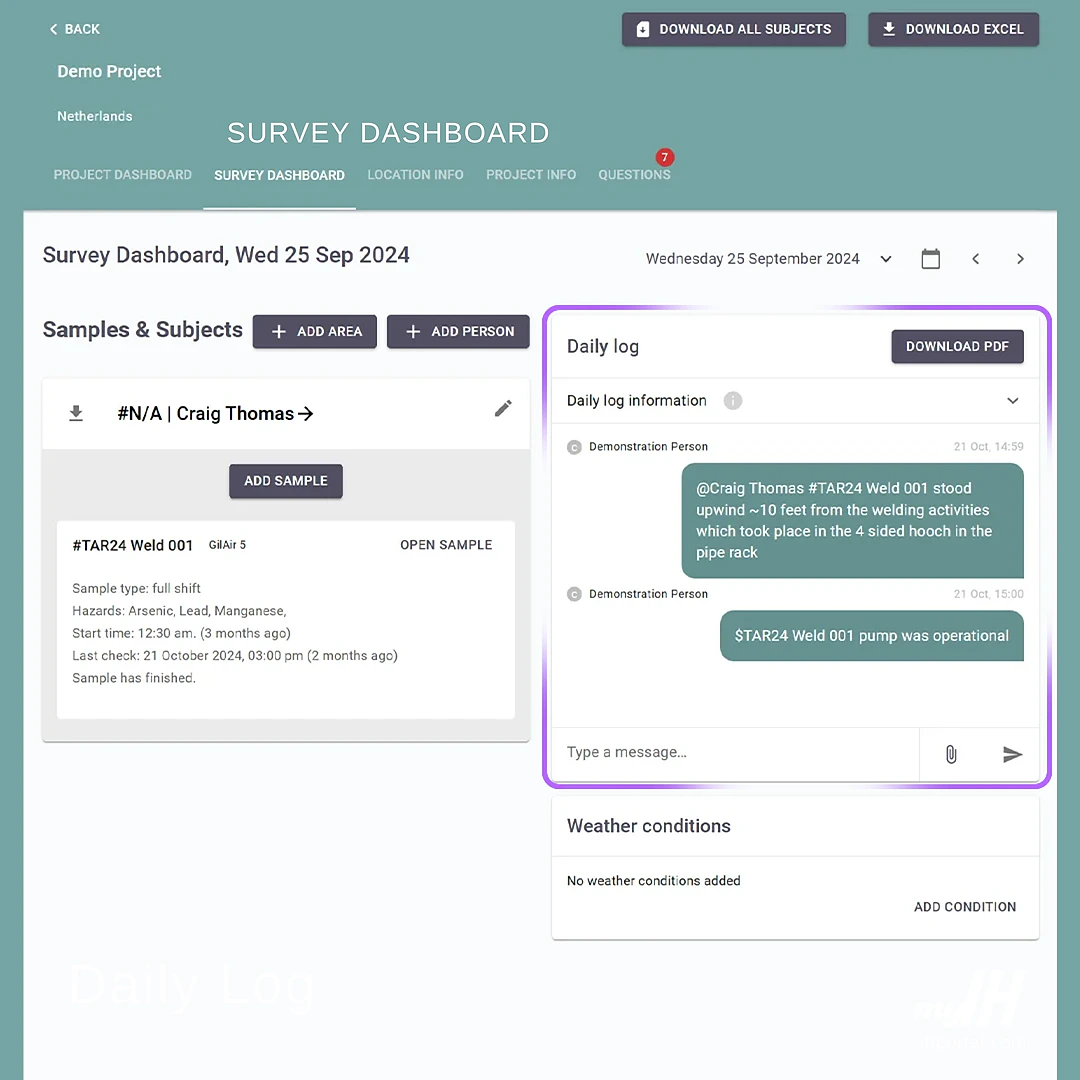
myIH Survey Dashboard showing Samples and Subjects beside the tagged Daily Log
@ People# Samples$ Pump checksOne connected record
DOCUMENT THE SAMPLECAPTURE THE FIELD DAYREVIEW RESULTS AGAINST OELsEXPORT WITH CONTEXT

OEL Dashboard sandbox

Step 1 of 8

Total # of samples collected by % of OEL category

> 100% of OEL50% - 100% of OEL10% - 50% of OEL1% - 10% of OEL< 1% of OEL
OEL Dashboard sample countsContoso Terminal: 0, 0, 2, 18, 7 in red, orange, yellow, blue and green categories; Fabrikam Fabrication: 2, 1, 6, 9, 3 in red, orange, yellow, blue and green categories; Northwind Chemical: 2, 3, 1, 1, 2 in red, orange, yellow, blue and green categories; Tailspin Shipyard: 3, 2, 12, 4, 0 in red, orange, yellow, blue and green categories; Adventure Works: 0, 1, 4, 1, 4 in red, orange, yellow, blue and green categories; Acme Coatings: 1, 2, 9, 5, 0 in red, orange, yellow, blue and green categories; XYZ Inc.: 1, 1, 5, 3, 1 in red, orange, yellow, blue and green categoriesContoso Terminal2187Fabrikam Fabrication21693Northwind Chemical23112Tailspin Shipyard32124Adventure Works1414Acme Coatings1295XYZ Inc.115310246810121416182022242628
Step 2 · The dashboard

Dashboard · Sam Garrison (DEMO)
Total # of samples collected by % of OEL category
Over 100% of OEL — over the exposure limit 50–100% 10–50% 1–10% < 1%
Select a colored band to inspect the sample count.
Step 3 · Structural Plan & Scenarios

Standardize what your samplers capture.

Record observations for the benzene sampling task. Answer the questions in any order.

YXY Company · 2026 IH Sampling Campaign

5133 Taravella Rd · Los Osos, CA. Contact: Site EHS Director. Sampling plan attached, question groups assigned. Samples taken: 11 / 59.

Benzene Air Sampling Questions — Full Shift & Short Term 6
Did product drip from the hose during sampling?
Activity included in the monitoring? (all that apply)
Were engineering controls operating during the task?
Was respiratory protection worn during the task?
Worker position relative to the emission source?
Any interruptions to sampling?
Step 4 · Attach the sample

Follow a personal air sample

A bench technician wipes steel parts at BMR Industrial. Follow the sample from the lapel to the laboratory.

Finish sample #BR-062124-001

Finish information

TWA Calculation Method
Equipment and lab results
BR-062124-001
0.050 Front bedBackup bedPump P-014

Collect the vapor

A personal charcoal tube captured toluene and o-xylene during the two-hour parts-cleaning task.

Media lot
CT-2406
Charcoal beds
100 / 50 mg
Step 5 · The survey dashboard workspace

Step 6 · Add results for IH review

Enter a number, for example 32
Samples by % of OEL · updates as results are added
>100%50–100%10–50%1–10%<1%
Your entries
No results yet — add one on the left.
Step 7 · Sample record

Read the field record

This data sheet is enlarged for screen reading. The next slide shows the two-page PDF in its normal print layout.

Job #
BR-0621-2024
Client
BMR Industrial
Sample ID
BR-062124-001
Project
Hazards Survey
Sampler
Sam Garrison
Location
Chambersburg, PA
Date
June 21, 2024
Subject and field conditions
Employee / ID
Bench technician / 001
Job title
Bench technician
Shift length
8 hours
Task
Wiping steel parts with solvent at the finishing bench
Sampling conditions
Average (Normal Operations)
Work environment
Shop/fabrication area
Ventilation
Local exhaust
Welding process
N/A
Metal / electrode
N/A
Unusual condition
N/A
Exposure control
Other — lidded solvent dispenser
Protective equipment observed
Clothing
Work Uniform
Respirator
None observed
Respirator filter
N/A
Gloves
Nitrile/Latex/Rubber Gloves
Boots
Steel Toe Boots
Eye wear
Safety Glasses with Side Shields
Hearing protection
None observed
Noise reduction rating
N/A
Head protection
N/A
Equipment, calibration and sample times
IH instrument
SKC Pocket Pump TOUCH
Pump serial
P-014
Calibration device
SKC chek-mate (low flow)
Calibrator serial
FC-02
Sample media
Coconut-shell charcoal tube, 100/50 mg
Media lot
CT-2406
Start / stop
08:00 – 10:00
Duration
120 min
Pre / post flow
0.050 / 0.050 L/min
Average flow
0.050 L/min
Air volume
6.00 L
Sample type
Personal task sample
TWA calculation
No full-shift TWA calculated
Weather
Indoors; no outdoor weather entry
Chemical results and subject log messages
Toluene (108-88-3)
8.0 ppm
o-Xylene (95-47-6)
3.0 ppm
Method
NIOSH 1501 · GC/FID
Author: Sam Garrison   Date: 06/21/24 – 08:00

Tube attached at the lapel. Bench exhaust operating.

Author: Sam Garrison   Date: 06/21/24 – 09:00

Pump running. Parts wiping continued at the same bench.

Author: Sam Garrison   Date: 06/21/24 – 10:00

Sample stopped. Tube capped and labeled for the laboratory.

Step 8 · Printed export

The printed sample data sheet

BR-062124-001 · BMR Industrial
Fictional sample · Two A4 pages in their original proportions.

Open full-size PDF ↗

Download the PDF

Book a demo
Printed page 1 with subject, conditions, PPE, equipment, weather, and capture times.
Sample workspace · swipe the navigation to explore
Bridget SheltonDEMO
Interactive preview · sample data
The science of exposure
On the plant floor
Air Sampling Pump
2.0 L/min
Personal pump · full-shift · calibrated
Benzene · CAS 71-43-2
0.32 ppm
32% of OEL
GC–MS Analyzer
Run 04
12 samples · chain-of-custody documented
PCM Fiber Count
0.04 f/cc
< 1% of OEL
Respirable Dust
4.8 mg/m³
Respirable fraction · full-shift TWA
Exposure vs. OEL
118%
118% of OEL · IH review
THE SAMPLE IS ONLY PART OF THE STORY
Keep the sample and its field context together.
Scroll to follow the sample
FROM FIELDWORK TO FOLLOW-UP

Capture it once.
Keep the context.

#001 | Noise Tester
#NoiseTestCasella CEL Noise Dosimeter Calibrator
Sample type
Full shift
Hazard
Noise Dose
Start time
08:00 am
Last check
4:05 PM
Status
Finished with results
YOUR RECORDS, YOUR NEXT STEP

Where do they
go from here?

Choose a workflow to see how exports fit.

01 Project records

Employee exposure notes, chain-of-custody documents, and survey-day records.

PDF Share the recordXLS Work with the data
02 Analytics

Use Excel exports in your BI workflow. Custom templates can match your team’s needs.

myIH→Excel file→Your BI workflow
03 AI assistants

Upload an exported file to ChatGPT, Claude, or Copilot for use in your own workflow.

myIH→Exported file→Your AI assistant
Technician logging sample details on a phone beside an air sampling pump
Let's talk exposure data

Ready for a 15 minute demo?

Fifteen minutes to see field documentation, OEL management, and Excel / PDF exports in your workflow.

QUESTIONS & ANSWERS

Your questions about myIH.

Getting started

Who is myIH built for?

myIH is built for industrial hygiene teams and departments, including IH consultancies, CIHs, and in-house IH/EHS teams. It digitizes field notes and standardizes the sampling workflow, from planning to lab results.

Do you offer training?

Yes. Unlimited virtual training sessions.

What does our IT team need to do before we start?

Make sure your organization’s network allows access to the myIH web domain so your team can load the platform. The original implementation guidance recommends whitelisting the domain.

How do I find a project?

Use the Search Projects box in the Projects tab to filter by a project identifier. You can also adjust the number of rows shown per page.

Field notes and sampling

How does myIH standardize field documentation?

Prompted questions guide samplers through what to capture and keep their responses with the sampling information. The daily log records observations and events as the field day develops.

Can we tailor the questions to our projects?

Yes. Question groups can be assigned to projects so prompts focus on the work and observations relevant to the sampling assignment.

What types of prompted questions can we create?

Questions can use free text, dropdowns, multi-select, checkboxes, and radio options. Assign question groups to a project to guide the information samplers capture.

How does the sample plan support fieldwork?

Set up a sample plan in the Project Dashboard or import one using the myIH-format spreadsheet. The plan records who and what to sample and the planned sample count, helping the team follow the sampling assignment.

How are daily observations recorded?

The digital observation log keeps field notes together. Tags using @, #, and $ help associate and find information, while prompted responses capture the details your team expects for the assignment.

Does myIH record sampling equipment and calibration?

Yes. Record media, instrument and calibrator serial numbers linked to each sample, along with pre- and post-sampling calibration.

Can a CIH review the team’s field records remotely?

Yes. CIHs and managers can access the field notes and observations entered by the team to review context and follow up on details that need clarification.

Can we bring lab results into the survey?

Yes. Project Config includes an Upload Autoload Lab Results option for a user-initiated upload. Laboratory results can then be reviewed alongside the sampling records and field observations.

OELs and project records

How does myIH manage occupational exposure limits?

myIH supports OEL management, including designation of statutory and non-statutory limits. Dashboards display results as a percentage of the OEL and update as results are added.

What is included in an employee exposure note?

Employee exposure notes show the result against the OEL, plus the PPE worn and the date and time.

Does myIH create a sampling report?

No. myIH creates employee exposure notes, chain-of-custody documents, and survey-day PDFs and Excel files with all the context entered by the sampler. These records auto-generate and stay permanently on the project.

Can I download chain-of-custody documentation?

Yes. You can download chain-of-custody documentation from Project Config for a selected date range.

Exports and existing workflows

Can I export my records?

Yes. myIH offers one-click Excel and PDF exports, so your team can use the captured records in its existing review and documentation workflow.

Can we use myIH alongside Cority or another EHS system?

Yes. Export records from myIH, then import the files or place the PDFs in your other system’s document repository as supported by that system. This is a file-based workflow, not a native integration.

Can we use the data in BI tools or AI assistants?

Yes. Use Excel exports in your analytics workflow, or upload exported files to AI assistants such as ChatGPT, Claude, or Copilot. A shared SharePoint or Google Drive folder can hold exports for a BI workflow. These workflows use exported files.

Can you build export templates for our team?

Yes. Custom export templates can be built for your organization’s analytics and AI workflows.

Cookie preferences

Choose what you allow

Required for the site to work. Cannot be switched off.

Mixpanel. Records which pages and sandbox steps you use. Text you type is masked.

myIH / PRODUCT PREVIEW